# USSD APIs Documentation
# Introduction
There are several payment methods available for clients to pay for services and goods purchased at the Ghana Mine Repository Tracking and Control Room. One can make payment by using USSD codes. USSD stands for Unstructured Supplementary Service Data, it is a protocol used by mobile network operators to allow users to interact with various services through short codes. USSD codes are usually entered into your phone’s dial pad, and they enable you to perform certain tasks or access specific services.
# How to use USSD codes for payments
To access the payments options is so easy. All you have to do is;
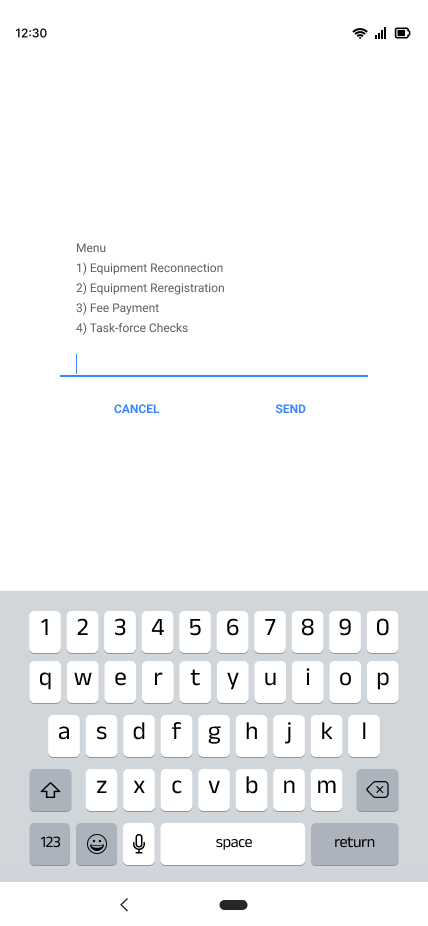
- Dial the USSD code (e.g. \*909#)
- Follow the on-screen prompts to select the payment option you want.
[](https://books.asgmgh.com/uploads/images/gallery/2023-03/9famenu.png)
# Equipment Reconnection
For equipment reconnection;
- Enter your chassis number and press send
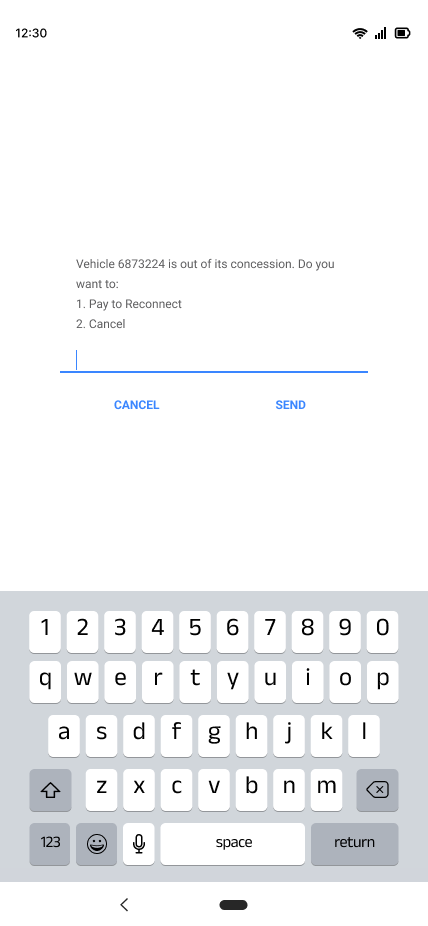
- A prompt confirming your chassis number and reason for the payment is sent
- You either press 1 to reconnect or 2 to cancel and then send.
[](https://books.asgmgh.com/uploads/images/gallery/2023-03/pay-decision.png)
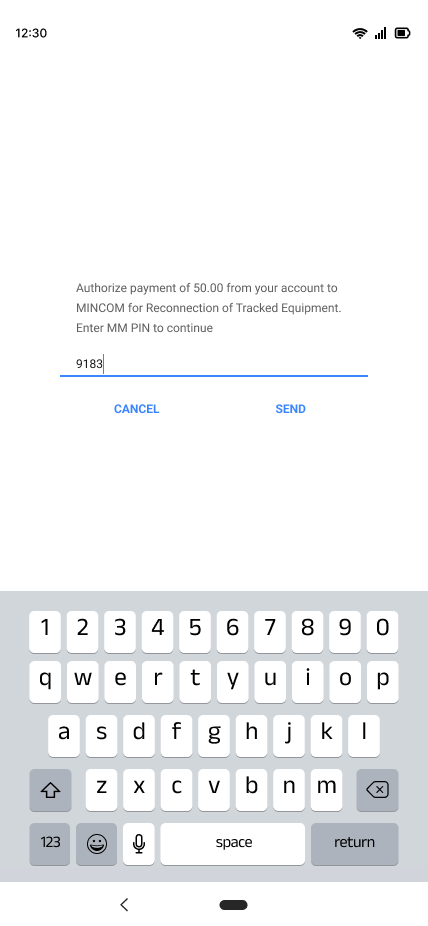
- After selecting 1 and sending you will receive a prompt to proceed with payment.
- You will then receive a prompt requiring you to enter you MM pin.
[](https://books.asgmgh.com/uploads/images/gallery/2023-03/authorize-payment.png)
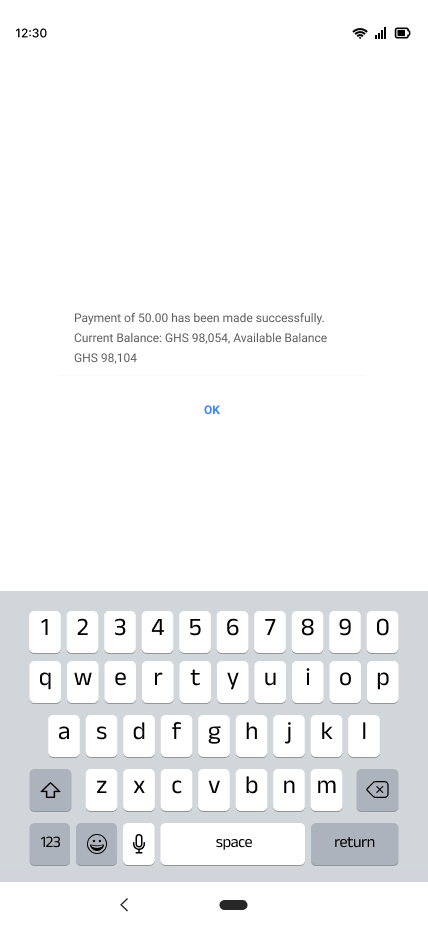
- After entering and sending your MM pin, you will then approve your transaction.
- You will receive a prompt stating that your payment has been made successfully.
[](https://books.asgmgh.com/uploads/images/gallery/2023-03/thank-you-final.png)
# Equipment Reregistration
For equipment reregistration;
- Enter your chassis number and press send.
- A prompt confirming your chassis number and enquiring if you want to move out of your concession is sent.
- You receive a prompt asking you to enter the file number of the concession you are moving your vehicle to.
[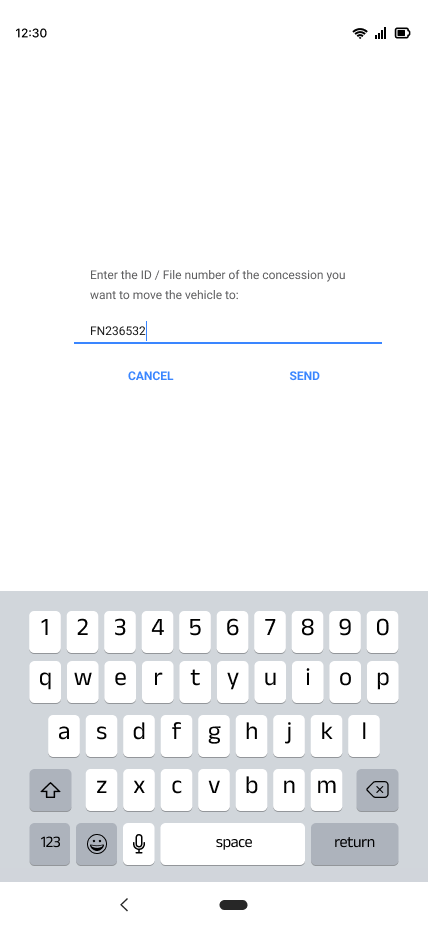](https://books.asgmgh.com/uploads/images/gallery/2023-03/mra-file-number.png)
- You are then asked to confirm the file number.
- You would be asked to proceed with payments.
[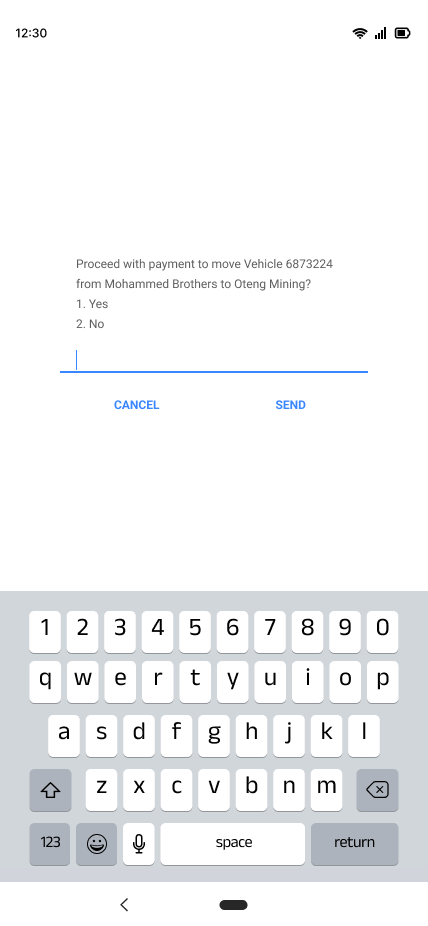](https://books.asgmgh.com/uploads/images/gallery/2023-03/7KUpay-decision.png)
- You will then receive a prompt requiring you to enter your MM pin.
- You will then approve your transaction.
- A prompt stating that your payment has been made successfully will be sent.
[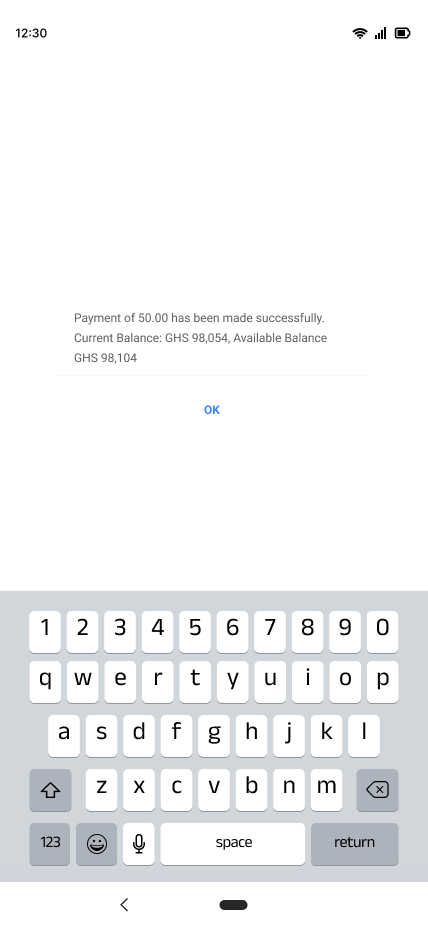](https://books.asgmgh.com/uploads/images/gallery/2023-03/jOpthank-you-final.png)
# Fee Payment
- Select the fee you are making payment to.
[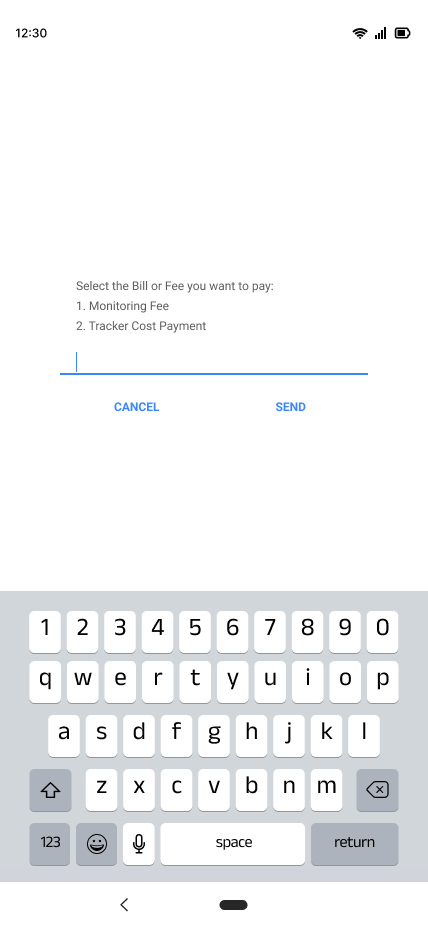](https://books.asgmgh.com/uploads/images/gallery/2023-03/select-bill.png)
1. Payment for monitoring fee
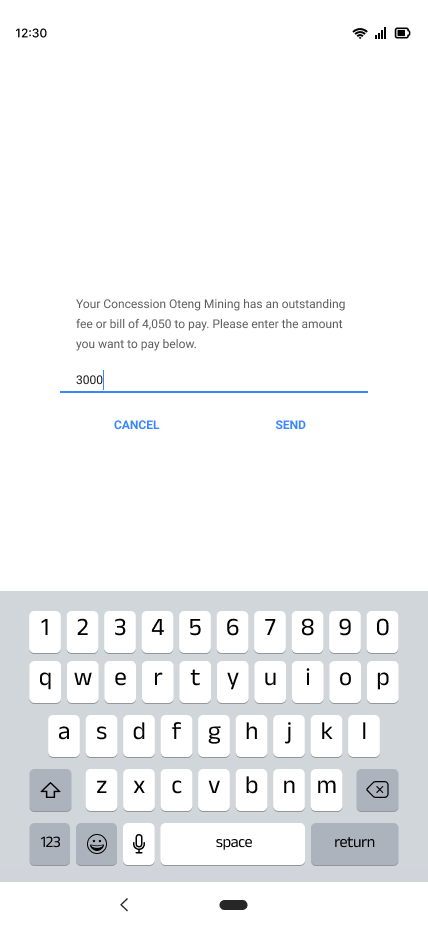
- You enter the file number of your concession.
- Afterwards you enter the amount you want to pay.
[](https://books.asgmgh.com/uploads/images/gallery/2023-03/enter-amount.png)
- You would be asked to proceed with payment of the stated amount you are making payments to.
- You will receive a prompt requiring you to enter your MM pin.
- You will then approve your transaction.
- A prompt stating that your payment has been made successfully will be sent.
2\. Tracker cost payment
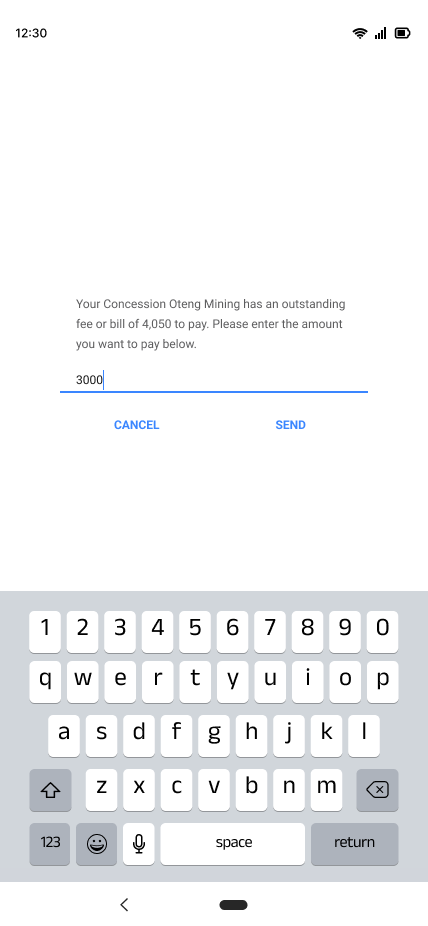
- You enter the file number of your concession.
- Afterwards you enter the amount you want to pay.
[](https://books.asgmgh.com/uploads/images/gallery/2023-03/9H8enter-amount.png)
- You would be asked to proceed with payment of the stated amount you are making payments to. [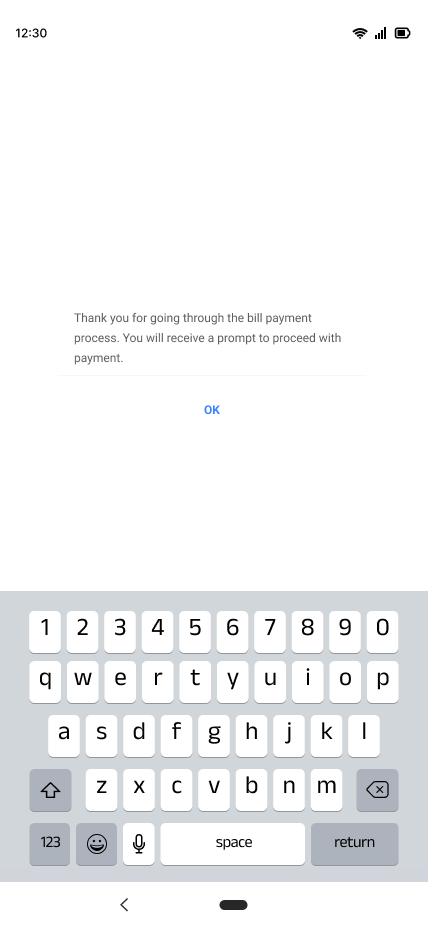](https://books.asgmgh.com/uploads/images/gallery/2023-03/ndAthank-you-process.png)
- You will then receive a prompt requiring you to enter your MM pin.
- You will then approve your transaction.
- A prompt stating that your payment has been made successfully will be sent. [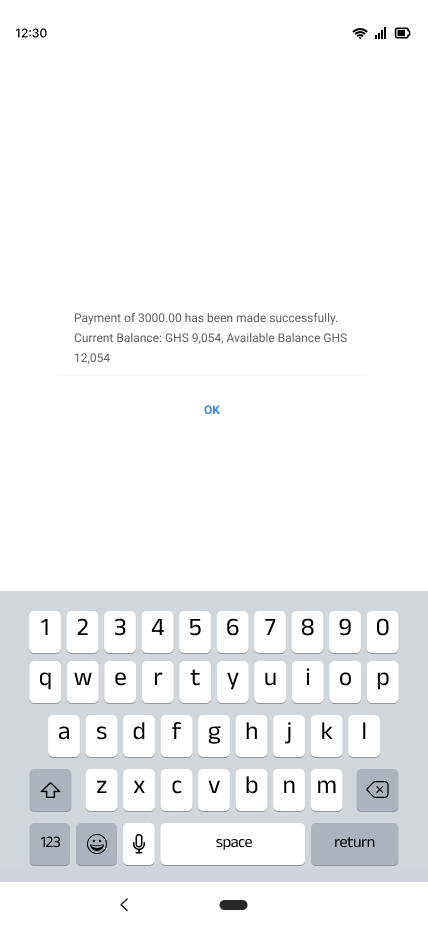](https://books.asgmgh.com/uploads/images/gallery/2023-03/Uqothank-you-final.png)
# Task-force checks
- Select from the options you are making payment to.
[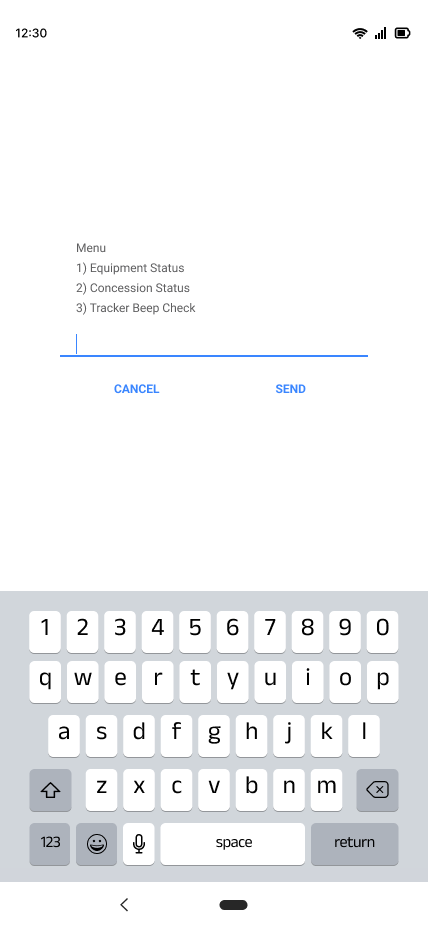](https://books.asgmgh.com/uploads/images/gallery/2023-03/checks-menu.png)
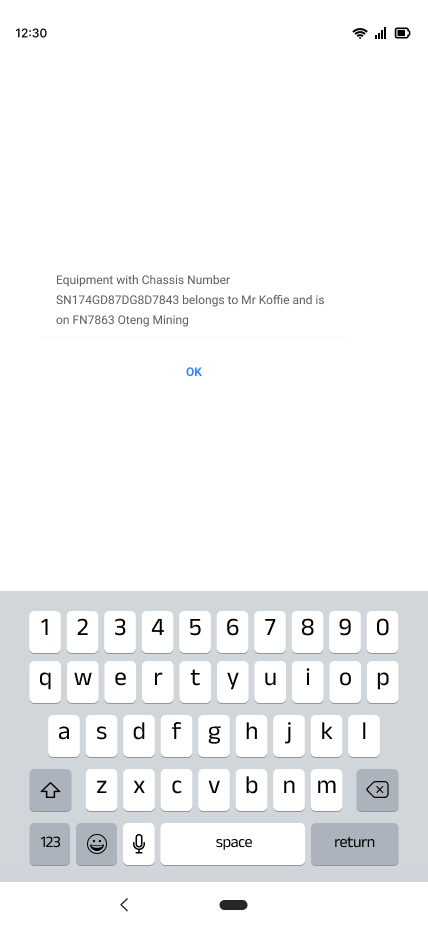
1. For equipment status
- Enter equipment chassis number.
- Confirm equipment chassis number.
- The equipment chassis number, name of owner and concession which the vehicle is on is sent.
[](https://books.asgmgh.com/uploads/images/gallery/2023-03/message.png)
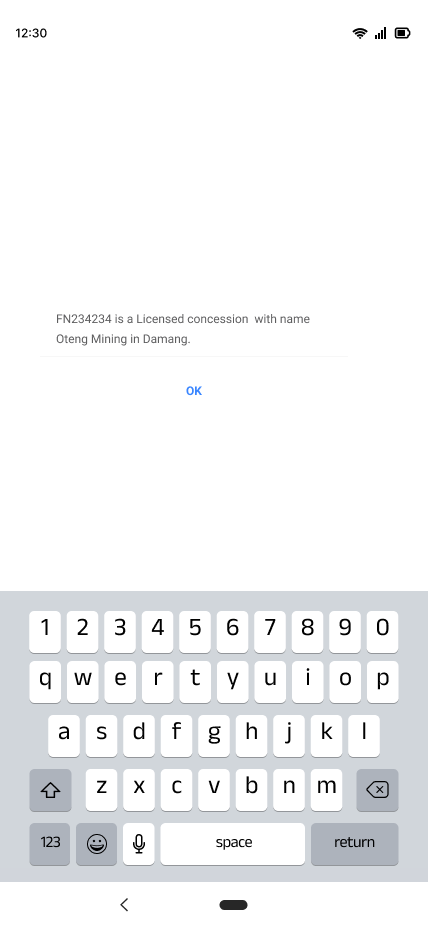
2. Concession status
- Enter concession file number.
- Confirm the file number.
- Your concession with name and location is sent.
[](https://books.asgmgh.com/uploads/images/gallery/2023-03/message-1.png)
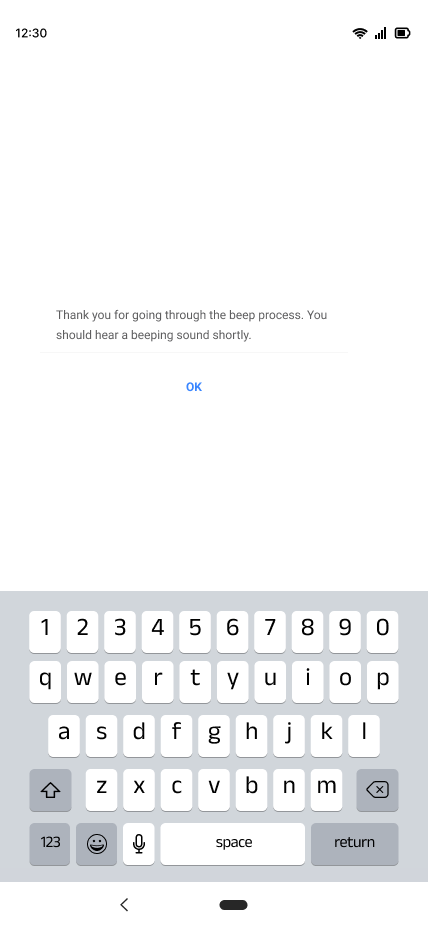
3\. Tracker beep check
- Enter equipment chassis number.
- Confirm equipment chassis number.
- Proceed to send a beep request.
- You will then hear a beeping sound.
[](https://books.asgmgh.com/uploads/images/gallery/2023-03/thank-you.png)
# Benefits of using USSD codes for payments
- Convenience: you can perform transactions at any time of the day, without having to go to a bank or coming to minerals.
- Accessibility: USSD codes work on all phones, even those without internet access.
- Security: USSD transactions require authentication.
- Speed: USSD transactions are usually completed in seconds.
# USSD guide
## **A guide to payment using USSD**
A complete guide that aids clients in selecting the best payment options using the USSD codes.
Introduction
There are several payment methods available for clients to pay for services and goods purchased at the Ghana Mine Repository Tracking and Control Room. One can make payment by using USSD codes. USSD stands for Unstructured Supplementary Service Data, it is a protocol used by mobile network operators to allow users to interact with various services through short codes. USSD codes are usually entered into your phone’s dial pad, and they enable you to perform certain tasks or access specific services.
How to use USSD codes for payments
- Dial the USSD code (e.g. \*909#)
- Follow the on-screen prompts to select the payment option you want.
[](https://books.asgmgh.com/uploads/images/gallery/2023-03/aab.png)
1. For Equipment Reconnection
- Enter your chassis number and press send
- A prompt confirming your chassis number and reason for the payment is sent.
- You either press 1 to reconnect or 2 to cancel and then send.
[](https://books.asgmgh.com/uploads/images/gallery/2023-03/aac.png)
- After selecting 1 and sending you will receive a prompt to proceed with payment.
- You will then receive a prompt requiring you to enter your MM pin
[](https://books.asgmgh.com/uploads/images/gallery/2023-03/aad.png)
- After entering and sending your MM pin, you will then approve your transaction.
- You will receive a prompt stating that your payment has been made successfully.
[](https://books.asgmgh.com/uploads/images/gallery/2023-03/aae.png)
2. Equipment Reregistration
- Enter your chassis number and press send
- A prompt confirming your chassis number and enquiring if you want to move out of your concession is sent.
- You either press 1 to reconnect or 2 to cancel and then send
- You receive a prompt asking you to enter the file number of the concession you are moving your vehicle to.
[](https://books.asgmgh.com/uploads/images/gallery/2023-03/aaf.png)
- You are then asked to confirm the file number.
- You would be asked to proceed with payments.
[](https://books.asgmgh.com/uploads/images/gallery/2023-03/aag.png)
- You will then receive a prompt requiring you to enter your MM pin
- You will then approve your transaction.
- A prompt stating that your payment has been made successfully will be sent.
3. Fee payment
- Select the fee you are making payment to.
[](https://books.asgmgh.com/uploads/images/gallery/2023-03/aah.png)
Payment for monitoring fee
- You enter the file number of your concession
- Afterwards you enter the amount you want to pay.
[](https://books.asgmgh.com/uploads/images/gallery/2023-03/aai.png)
- You would be asked to proceed with payment of the stated amount you are making payments to.
- You will then receive a prompt requiring you to enter your MM pin
- You will then approve your transaction.
- A prompt stating that your payment has been made successfully will be sent.
Tracker cost payment
- You enter the file number of your concession.
- Afterwards you enter the amount you want to pay.
- You would be asked to proceed with payment of the stated amount you are making payments to.
- You will then receive a prompt requiring you to enter your MM pin.
- You will then approve your transaction.
- A prompt stating that your payment has been made successfully will be sent.
4. Task-force checks
- Select from the options you are making payment to
[](https://books.asgmgh.com/uploads/images/gallery/2023-03/aaj.png)
For equipment status
- Enter equipment chassis number.
- Confirm equipment chassis number.
- The equipment chassis number, name of owner and concession which the vehicle is on is sent.
[](https://books.asgmgh.com/uploads/images/gallery/2023-03/aak.png)
Concession status
- Enter concession file number
- Confirm the file number.
- Your concession with name and location is sent.
[](https://books.asgmgh.com/uploads/images/gallery/2023-03/aal.png)
Tracker beep check
- Enter equipment chassis number
- Confirm equipment chassis number.
- Proceed to send a beep request.
- You will then hear a beeping sound.
[](https://books.asgmgh.com/uploads/images/gallery/2023-03/aaaa.png)
#### **Benefits of using USSD codes for payments:**
- Convenience: You can perform transactions at any time of the day, without having to go to a bank or coming to Minerals commission to make payment.
- Accessibility: USSD codes work on all types of phones, even those without internet access.
- Security: USSD transactions require authentication.
- Speed: USSD transactions are usually completed in seconds.